Track Claude Code usage and costs across a team
Claude Code already reports every request and tool call over OpenTelemetry. Point it at a Kaeso source to see each developer's tokens, cost and MCP tool calls in one place.
- Published
- Reading time
- 3 min
- Author
- Kaeso Team

Claude Code is often the biggest line on a team's model bill, and the hardest to see. Each developer runs it on their own machine, it calls Anthropic directly, and the numbers end up split across laptops and invoices. Which projects use it, how much each person spends, which MCP servers it calls and how often requests fail are all questions without a single place to answer them.
Claude Code can answer them itself: it reports every model request and tool call as an OpenTelemetry event. A source in Kaeso 0.7.1 receives those events and turns them into observed requests, with their tokens and cost, in the project's request log, usage and analytics. Claude Code keeps calling Anthropic with its own key; nothing about where it sends requests changes.
Connect Claude Code in two minutes
In a project, open Sources, choose Add source, pick Claude Code and name it, such as Claude Code, Ada's laptop. Kaeso shows the source's key once, with the lines for ~/.claude/settings.json:
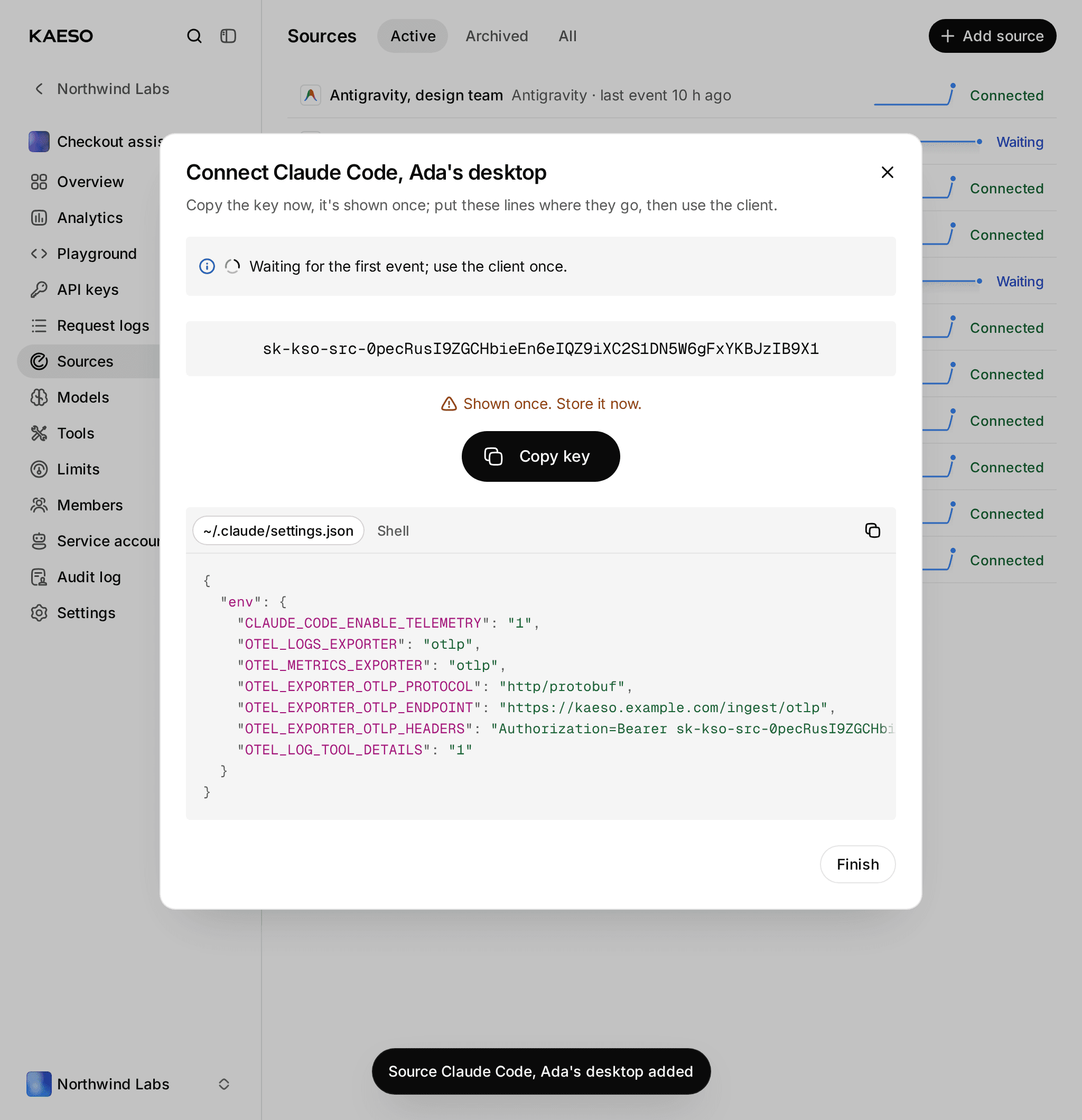
Start Claude Code and send it a prompt. Within a few seconds the dialog shows Connected, and the request appears in the project's request log, marked Observed. Claude Code sends its events every few seconds and when it exits.
Two of those lines matter more than they look. Keep OTEL_EXPORTER_OTLP_PROTOCOL: some Claude Code versions export nothing without it. And OTEL_LOG_TOOL_DETAILS=1 makes Claude Code name the MCP server and tool of each call, such as linear and list_issues; without it, each MCP call still shows, but only as mcp_tool.
The same variables work as export lines for one shell or a CI job, and the dialog has them under Shell.
One source for the whole team
You don't need a source per laptop. Put the variables in Claude Code's managed settings and every developer's Claude Code reports to the same source. Then turn on Match members by email for it: each request counts for the organization member whose address the event names, so usage, costs and limits are per person again.
Matching by email is off by default, since anyone with the source key could name any member. A request counts only for someone who can see the project; one that would count for nobody who can is refused.
What you see
Kaeso prices each request from the project's catalogue or from KPMR, so Claude Code's requests cost the same as the same model's requests through the gateway; Claude Code's own cost is used only for a model neither knows. Kaeso counts input without what came from or went into the cache, as Claude Code already does, and turns the counts of Codex, Gemini CLI and OpenTelemetry apps, which include it, into the same, so cache hit rates compare across clients. Calls to Claude Code's built-in tools, such as reading files or running commands, aren't kept: the tool-call log shows the MCP servers your team relies on.
Analytics › By source then puts Claude Code beside everything else the project uses, and a spend limit on the project or a member counts Claude Code's spend too. Kaeso can't stop a request Claude Code sends to Anthropic directly, but budget alerts reach you before the month's bill does.
Prompts stay on the laptop unless you ask
Claude Code leaves your prompts out of its events. To keep them, turn on Keep prompts and replies for the source (the project must keep request content too) and add OTEL_LOG_USER_PROMPTS=1. With OTEL_LOG_TOOL_DETAILS=1, the MCP tool calls then also carry their arguments.
Gateway or source, not both
If your team already sends Claude Code through Kaeso's gateway, with ANTHROPIC_BASE_URL pointing at your install (coding tools (opens in a new tab)), its requests are already logged, and you get aliases, guardrails and fallbacks as well. A source is for the setups where that isn't the case. Kaeso leaves out a reported request that matches a gateway request of the same project, model and tokens within five seconds, but the safe setup is one or the other.
The Claude Code guide (opens in a new tab) in the docs has every variable, and the sources guide (opens in a new tab) covers Codex, Gemini CLI, Antigravity and Grok Build the same way.
Product names in this article belong to their owners and are used only to name the software and services involved. Kaeso is not affiliated with or endorsed by them.
By Kaeso Team