Fallbacks, conditions and splits with alias routes
In Kaeso 0.6.0 an alias holds a route. Fall back to another model when one fails, send enterprise traffic or long prompts somewhere else, and A/B test two models by caller, all without changing a line in your app.
- Published
- Reading time
- 4 min
- Author
- Kaeso Team

An app names a model in every request, and that name tends to stay in the code long after the model behind it should have changed. Kaeso's aliases have always helped there: the app sends support, and the project decides which model answers.
In 0.6.0 an alias holds a whole route. It can fall back to another model when one fails, send some requests one way and the rest another, and split traffic between models by weight. The app still sends only "model": "support".
Three kinds of step
A route is a tree of steps. A route of one model is the alias as it always was.
A route has at most 32 steps and is at most 12 deep, and every model it names must be in the project's catalogue.
Fallbacks
When a model step fails, Kaeso moves on to its fallback if the step's fall_back_on lists the reason:
A step falls back on the first three unless it lists others. Add rejected only for a fallback that can take what the first model refused, such as a model with a longer context. A step's timeout_seconds sets how long Kaeso waits for the first byte before it moves on.
Once the provider has started to answer, nothing falls back: a stream that breaks off later ends with an error event, as it would without a route.
Failures that last are skipped
A refused key, an empty balance or a rate limit doesn't fix itself in the next second. When a step fails for a reason that lasts, later requests skip it for a while and go straight to the next step: 5 minutes for a refused key or an empty balance, as long as Retry-After says for a rate limit, 30 seconds for a timeout or a 5xx. An answer from the model ends the wait. Every gateway of an install shares this through Valkey, so a step one gateway saw fail is skipped by all of them.
Conditions
A condition reads facts about the request, with 1 to 10 rules joined by all or any:
- A header equals, contains, or is present or absent. Send
x-plan: enterprisefrom your app, and route paying customers to a larger model. - The format of the app, such as
anthropic_messagesorgemini. - A feature the request uses: images, PDFs, tools, reasoning, structured output or streaming.
- Input tokens, at least or below a number, to send long prompts to a model with a longer context.
- The caller: the API key, member or service account that sent it.
Routes never read headers that carry credentials, such as authorization or x-api-key.
Splits
A split draws a number for each request and takes the branch its weight covers. How it draws decides what the split is good for:
by: requestdraws anew every time, for spreading load.by: callerkeeps each API key, member or service account on one branch. Use it for A/B tests, so one app sees one model. Changing the weights later moves only the callers whose draw crosses a new boundary.by: headerkeeps each value of a header on one branch, such asx-user-id, so each of your users sees one model behind a single API key.
A route, read from top to bottom
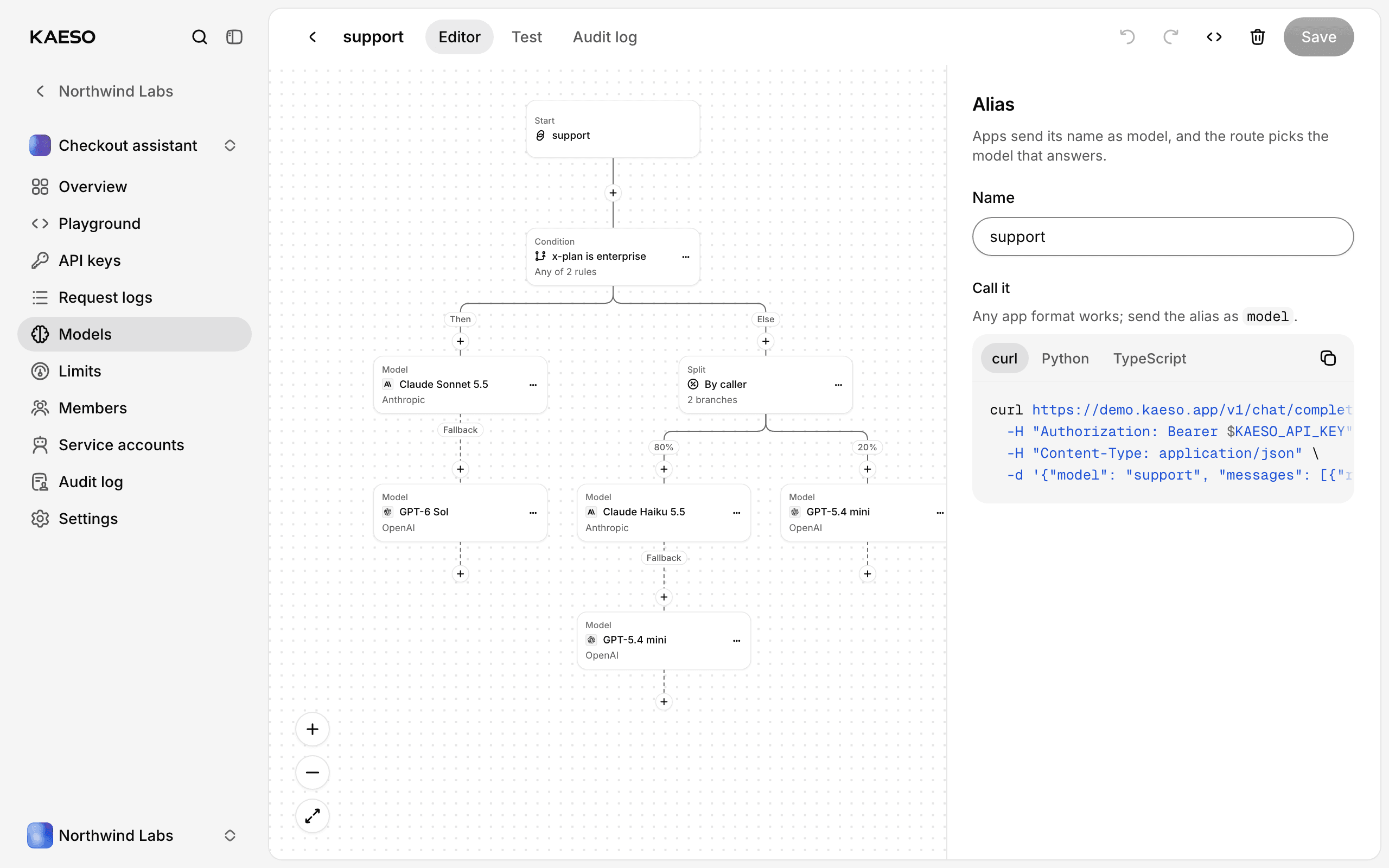
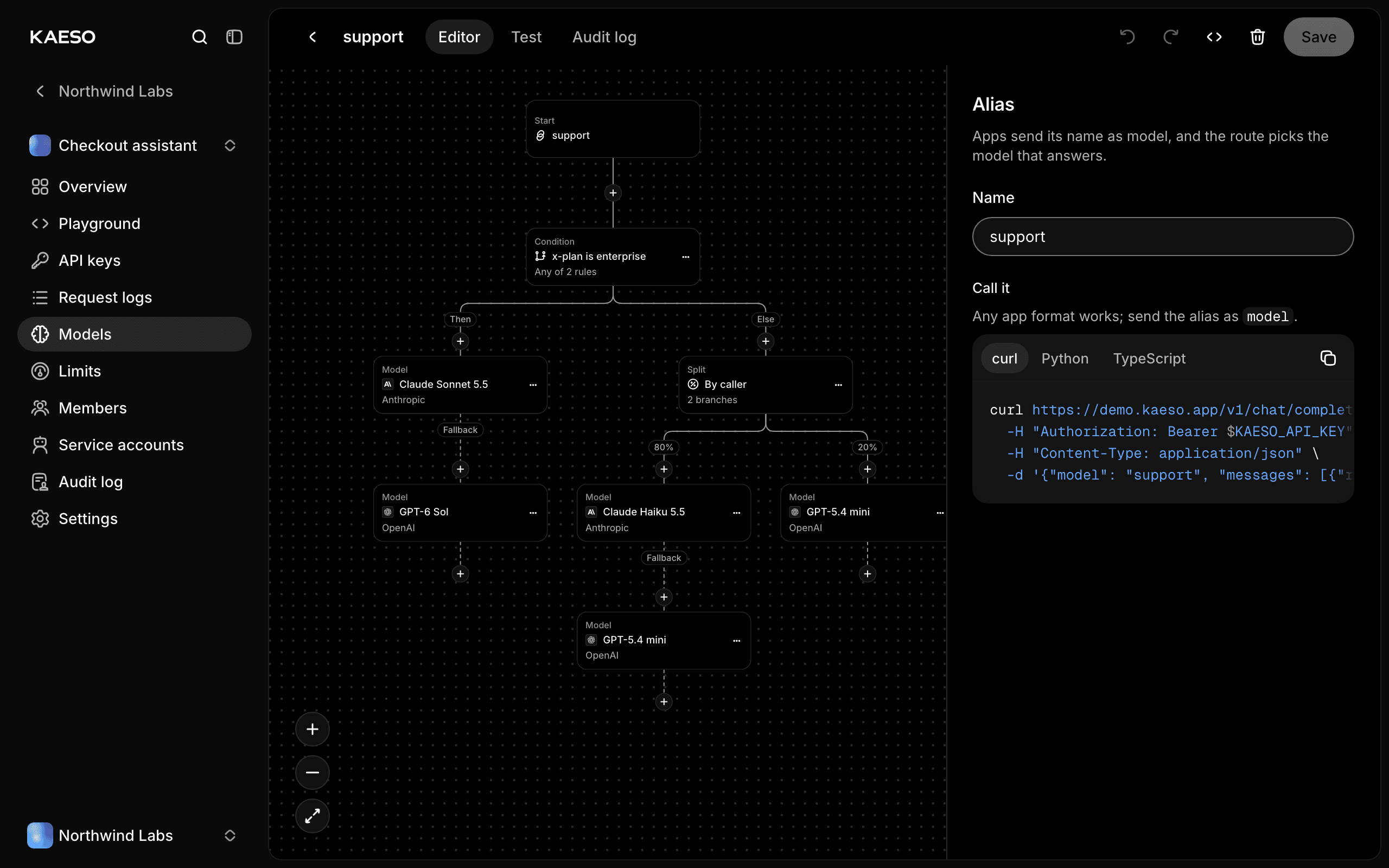
The live demo (opens in a new tab) has a support alias that shows all three in one route. Requests with x-plan: enterprise, or with at least 100,000 input tokens, go to Claude Sonnet 5.5, with GPT-6 Sol as its fallback. Every other request is split by caller: about four in five get Claude Haiku 5.5, with GPT-5.4 mini as its fallback, and the rest get GPT-5.4 mini.
Build and test it in the console
Open Models › Aliases in a project and create an alias, or open one. The route editor is a full page: start from one of its templates, or build the tree step by step. Its Test tab sends a request through the draft, before you save it, and colors each step by its answer. A trace shows each condition with the rules that held, the number each split drew and the branch it took, and every model the request would try, in order.
The same trace is on the Platform API, so a script or a CI job can check a route before it goes live, and agents get it as a read-only tool over MCP.
What apps and logs see
kaeso-modelandkaeso-providername the step that answered.kaeso-routenames every step the request reached, in order, with its model, status and time:"route";model="anthropic/claude-sonnet-5-5";status=529;dur=1204, "route.fallback";model="openai/gpt-6-sol";status=200.- The request log keeps the alias as the requested model and lists every step tried or skipped, with its status and error.
- Usage and cost are the answering step's. Failed steps cost nothing in Kaeso, and a step that fails gives back what it held of a budget before the next one asks.
kaeso_alias_fallbacks_total{provider, reason}counts fallbacks and skips for your dashboards.
A key that may not use a step's model skips it without learning its name, so a restricted key learns nothing about the route.
Next steps
- Alias routes (opens in a new tab) in the docs has every rule and field.
- Models and aliases (opens in a new tab) walks through the editor.
- Kaeso 0.6 has everything else the release added.
By Kaeso Team