Key pools, weights and rotation across provider keys
Assign several keys of one provider to a Kaeso project with weights. Each caller sticks to one key so prompt caches stay warm, failed or rate-limited keys give way automatically, and keys rotate without app changes.
- Published
- Reading time
- 4 min
- Author
- Kaeso Team

A single upstream API key is a single quota and a single point of failure. Teams running production workloads often hold several keys for the same provider — Azure OpenAI resources in two regions, separate OpenAI or Anthropic billing accounts, or an overflow key for traffic spikes — and need to rotate secrets without redeploying every application.
In Kaeso 0.7.0, an organization connects its provider keys once under Providers, and each project can use either the provider's default key or a weighted pool of assigned keys with sticky caller assignment and automatic failover.
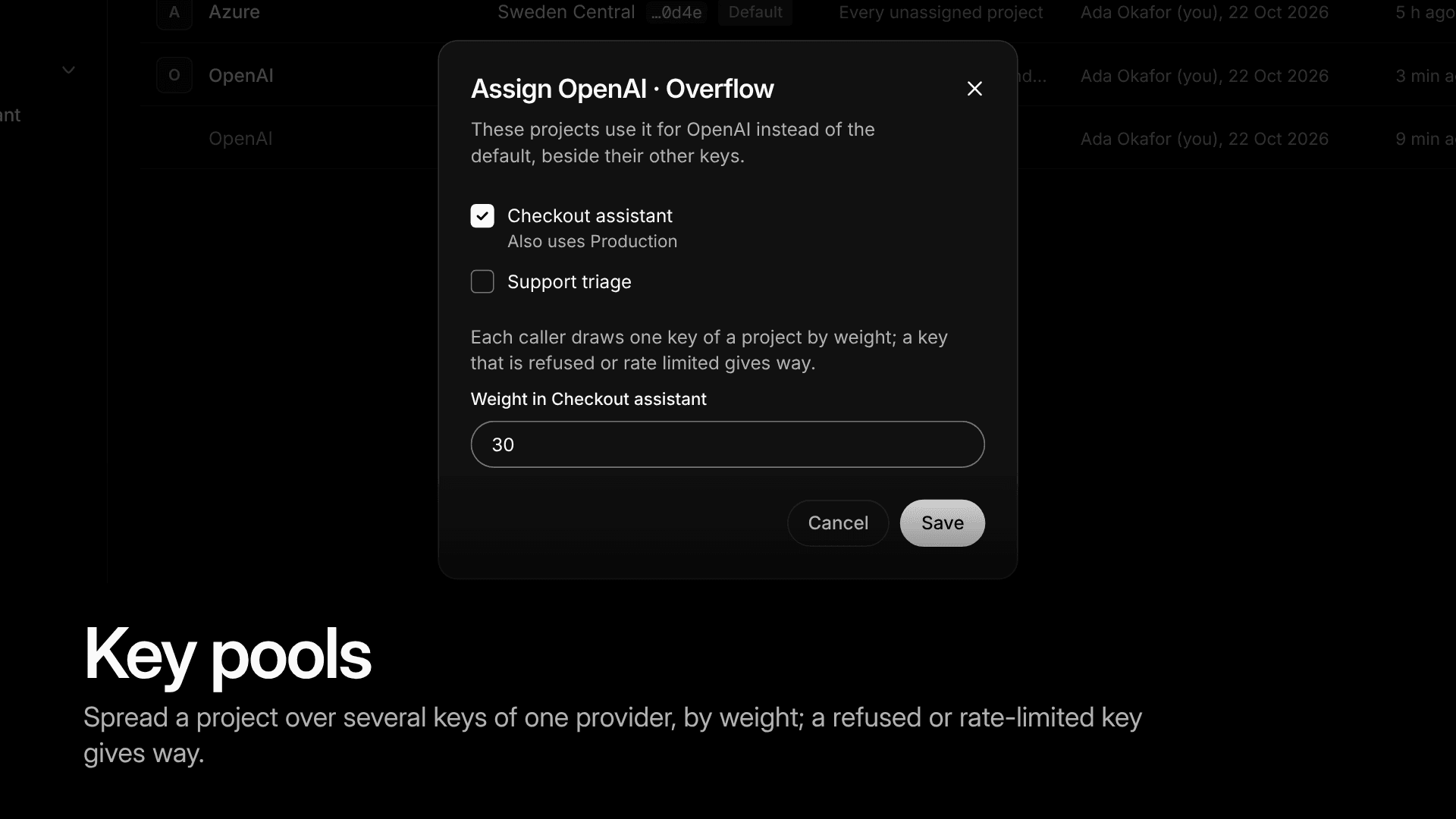
Default keys and project key pools
Every provider in an organization has one default key (the first key you add for that provider, or whichever key you mark with Make default). Any project without explicit assignments uses the default key for that provider.
To give a project its own key — or a pool of several keys for the same provider:
- Open Providers, open the menu of a provider key, and choose Assign to projects.
- Tick the project (or open the project's assignments) and give each assigned key a Weight in the project from
1to100.
For example, assigning OpenAI · Primary with weight 70 and OpenAI · Overflow with weight 30 gives the project a two-key pool for every OpenAI model in its catalogue.
Sticky weights keep prompt caches warm
If a gateway picked a random provider key on every HTTP request, two turns of the same coding agent or chat conversation would hit different upstream accounts — destroying Anthropic's and OpenAI's prompt caching and doubling input token costs.
Kaeso avoids this by drawing a key per caller (by the caller's Kaeso API key, service account or member ID) in proportion to the keys' weights (1 to 100) and keeping that caller on the same provider key across turns. Every gateway replica in your install computes the same draw, so horizontal scaling behind a load balancer or in Kubernetes preserves prompt-cache locality.
(Asynchronous video generation jobs, which the app polls in later requests, always use the project's first assigned key so status checks reach the account that created the job.)
What happens when a key fails or hits a rate limit
When a key in a project's pool is rate-limited (429), out of credit, signed out or refused by the provider:
- Immediate failover within the pool. Kaeso moves the request to the project's next assigned key for that provider — before any alias route falls back to a different model.
- Shared cooldown in Valkey. The key that failed waits in Valkey across all gateway instances: for the duration of the provider's
Retry-Afterheader on a rate limit, or for5minutes on a refused key, empty balance or expired session. While it waits, all callers use the remaining healthy keys in the pool. - Traceable in
kaeso-routeand Analytics. A step that tried a second key reportstries=2inkaeso-route. Under Analytics › Overview, the By key that paid breakdown groups spend and requests by the exact provider key that served each request.
If a provider refuses a key three times in a row — or ends an OAuth/Entra session — Kaeso emails every member who holds the Change provider keys right, naming the provider, the key's last four characters, the affected projects and the provider's error message.
Cloud identities and 50 built-in providers in 0.7.0
Kaeso 0.7.0 expands built-in providers to 50 and supports cloud-native credentials alongside standard API keys:
- Amazon Bedrock: Sign in with a long- or short-term Bedrock API key (
ABSK…/bedrock-api-key-…), an IAM access key signed with SigV4, or the gateway's own AWS identity (EC2 instance profile, ECS task role, or EKS IAM role for service accounts, with optional STSAssumeRoleand External ID whenaws.ambient_credentialsis enabled). Assign keys in multiple AWS regions to a project to pool regional Bedrock quotas. - Azure: Sign in to each Azure OpenAI or Azure AI Foundry resource with a resource key (
api-key) or a Microsoft Entra ID service principal (tenant ID, client ID and client secret, automatically exchanged and refreshed five minutes before expiry). Assign resources from several Azure regions to one project to balance load and fail over across regions. - Gemini Enterprise Agent Platform: Sign in with an express mode API key or a Google Cloud service account JSON key (
roles/aiplatform.user) pinned toglobal,us,euor a specific region. - Cloudflare AI Gateway: Sign in with a Cloudflare API token (
Account → Workers AI → Read), account ID and optional gateway ID.
How keys are encrypted and rotated
Apps never see your provider keys; they authenticate to Kaeso with project API keys (sk-kso-…). Inside Kaeso:
- Envelope encryption at rest. Every provider key and credential file is encrypted with AES-256-GCM under the install's master key ring (
KAESO_MASTER_KEYS//opt/kaeso/master-keys) before it is written to PostgreSQL. The console never displays a secret after creation — only its name, last four characters (or service account / tenant metadata) and last-used timestamp. - In-memory caching with background refresh. Gateways keep decrypted keys in memory for 30 seconds and refresh active projects' keys in the background for 15 minutes after each request, so requests never block on a database lookup.
- Zero-downtime secret rotation (Replace). When you rotate a secret at a provider, open the key's menu in Providers and choose Replace. Paste the new secret (or upload the new service account JSON). Gateways pick up the replacement within 30 seconds without changing the key's ID, weights or project assignments.
- Master key rotation. To rotate the install's master key itself, prepend a fresh key from
kaeso master-key generateto/opt/kaeso/master-keysand runkaeso master-key rewrap(backups and master keys (opens in a new tab)).
Next steps
- Provider keys in the docs (opens in a new tab): step-by-step setup for Amazon Bedrock, Azure, Google Cloud and Cloudflare AI Gateway keys.
- Retries, cooldowns and fallbacks: how key failover combines with same-model retries and alias routes.
- Supported providers: all 50 built-in providers and the formats they serve.
Product names in this article belong to their owners and are used only to name the software and services involved. Kaeso is not affiliated with or endorsed by them.
By Kaeso Team