Single sign-on, SCIM 2.0, roles and service accounts
Set up Kaeso for a whole company in the open-source release: OpenID Connect SSO with verified domains, SCIM 2.0 provisioning, SSO group rules, custom roles, service accounts and agent policies.
- Published
- Reading time
- 4 min
- Author
- Kaeso Team

In many open-source tools, identity management is where the open-source edition stops: single sign-on, SCIM directory sync and custom roles sit behind an enterprise license key.
In Kaeso, every identity and access-control feature ships in the MIT-licensed repository. An organization connects its own OpenID Connect (OIDC) identity provider, verifies its email domains, provisions and deprovisions employees through SCIM 2.0, maps directory groups to organization roles and project memberships, and separates human members from service accounts and coding agents.
1. OpenID Connect single sign-on and verified domains
Each organization configures single sign-on under Organization settings › Security › Connect an identity provider:
- Register Kaeso's callback URL at your OIDC provider (Okta, Microsoft Entra ID, Google Workspace, Keycloak, Authentik or any standards-compliant OIDC issuer) and enter the issuer URL, client ID and client secret.
- Add the email domains your organization owns (internationalized domains work in Unicode or punycode) and verify each one by adding its
_kaeso-verify.<domain>DNS TXT record — or, for internal domains without public DNS, viakaeso sso verify-domain <domain>on the server. Public mail domains such asgmail.comcannot be claimed. - Choose whether new users at verified domains can join on their first SSO sign-in with a default role (any role except Owner) or remain Invite only, and optionally enable Start without a click so entering an address at your verified domain redirects straight to your identity provider.
Once a domain is verified, the organization manages the accounts at that domain. Turning on Require single sign-on ensures those accounts sign in only through your identity provider and terminates any password or magic-link sessions they held. External contractors at other domains appear as Guest members and keep their own sign-in method (and can be covered by Require two-factor authentication).
2. SCIM 2.0 provisioning: when someone leaves, their keys stop working
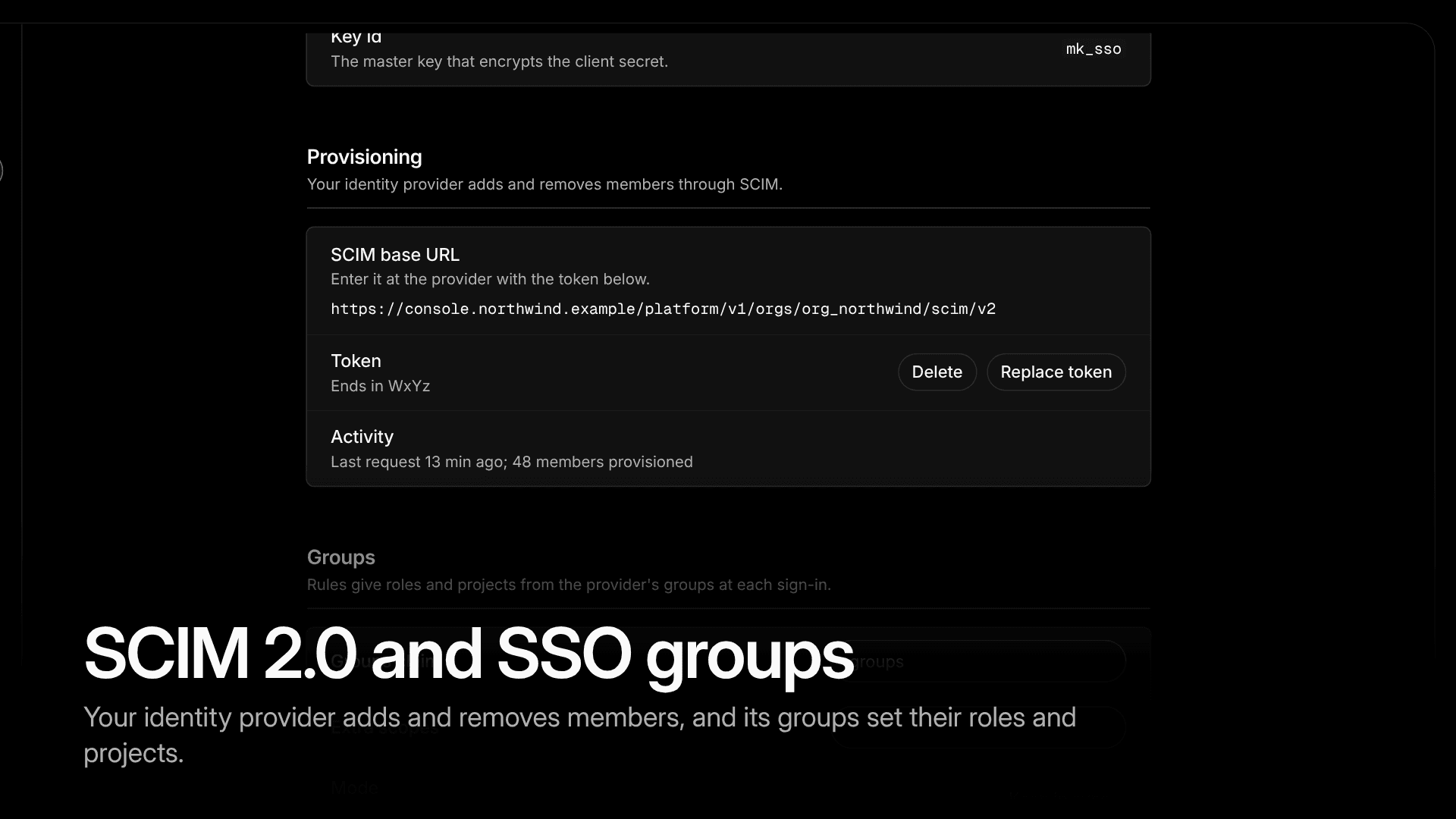
New in Kaeso 0.7.0, Security › Provisioning provides a SCIM 2.0 (opens in a new tab) endpoint at:
Generate a bearer token (Kaeso stores only its hash, and Replace token keeps the previous token valid for 24 hours so you can rotate it at your identity provider without downtime) and point Okta, Microsoft Entra ID or another SCIM 2.0 client at the base URL:
- Provisioning (
/Users): Creating a user at a verified domain creates their Kaeso account and adds them to the organization with your default SSO role. - Immediate deprovisioning (
active: falseorDELETE): When someone leaves the company and your identity provider deactivates them in SCIM, Kaeso immediately removes them from the organization and every one of its projects, archives all of their API keys in those projects, and terminates their active sessions — without anyone opening the Kaeso console. (The organization's last Owner cannot be deprovisioned automatically; SCIM returns409 Conflict.)
Every SCIM action is recorded in the organization's audit log (member.provision, member.deprovision) with the user's externalId.
3. Roles and projects from SSO groups
Under Security › Single sign-on › Groups, up to 200 rules map your identity provider's groups (from the groups claim, roles claim or custom scopes) to:
- an organization role (from the first matching rule), and
- one or more projects with a project role each (combined across all matching rules).
Two sync modes let you choose how group changes behave on each sign-in:
- Add only: Grants roles and project memberships from matching rules without removing existing ones.
- Keep in sync: Also removes roles and project memberships that were previously granted by a group rule when the user leaves that group — archiving the user's API keys in any project they leave — while preserving access an admin granted by hand. (A token that arrives without the groups claim changes nothing, so a misconfigured claim at the provider never strips access.)
For Microsoft Entra ID, which sends group object IDs and omits the inline list when a user belongs to more than 200 groups, Kaeso automatically follows the overage reference by querying Microsoft Graph with the sign-in's access token (when the app has delegated User.Read).
4. Built-in roles, custom roles and privilege boundaries
Kaeso separates organization-wide governance from day-to-day project work:
- Six built-in organization roles: Owner, Admin, Billing, Developer, Auditor and Member.
- Three built-in project roles: Admin, Developer and Viewer.
- Up to 50 custom roles under Organization settings › Members › Roles (plus per-member right overrides via Customize).
Two invariants hold everywhere in the console, Platform API and SSO group rules: you can grant only rights you hold yourself, and you can modify or remove only members who hold no right that you lack.
5. Service accounts for software, and policies for members' agents
A production deployment or CI pipeline should never run on an employee's personal API key: when that employee leaves and SCIM deprovisions them, their keys are archived.
- Service accounts (
Projects›Service accounts): Create a project member for each application or environment (such ascheckout-production), give it a project role (Developer or Viewer), narrow the Models it may call, attach its own spend budgets and rate limits, and issue itssk-kso-…keys there. Service accounts are untouched when human members leave. - Policies for members' coding agents: When engineers connect personal agents (such as Claude Code or Codex) to Kaeso's MCP server (opens in a new tab), Security › Agents lets organization admins toggle Allow members' agents, cap the maximum preset an agent may use (Observer, Builder, Operator or Full access), and audit or revoke individual agents. Every change an agent makes is badged in the audit log with both the member and the agent (
actor.agent).
Next steps
- SCIM provisioning in the docs (opens in a new tab): Okta and Microsoft Entra ID setup, supported filters and endpoints.
- Members and roles in the docs (opens in a new tab): invitations, custom roles, model allow-lists and service accounts.
- Sign-in and single sign-on (opens in a new tab): managed accounts, step-up authentication (
auth_time) and recovery commands.
Product names in this article belong to their owners and are used only to name the software and services involved. Kaeso is not affiliated with or endorsed by them.
By Kaeso Team