How Kaeso tracks models, prices and retirements with KPMR
How Kaeso syncs signed model data from KPMR, tracks provider deprecations and shutdown dates, shows which apps still call a retiring model, and moves aliases or model lines automatically.
- Published
- Reading time
- 4 min
- Author
- Kaeso Team

An AI gateway needs more than a list of model names. To enforce hard spend budgets, translate between API formats without silent data loss, and warn teams before a provider shuts a model down, the gateway has to know each model's exact prices, context limits, supported parameters and retirement dates.
Kaeso gets those facts from KPMR (opens in a new tab), the Kaeso Provider & Model Registry. Every install ships with a built-in snapshot of the KPMR catalogue and keeps it current in the background from kpmr.kaeso.app, checking an Ed25519 signature before applying any change. In Kaeso 0.7.0, KPMR also powers two features that take the fire drill out of model churn: model lifecycle tracking and model lines.
What the signed KPMR catalogue carries
When you add a model to a project's catalogue, its defaults come from KPMR (/v1/catalogue, format 1):
- Exact decimal prices in US dollars per million tokens (
input,output,cache_read,cache_write, andcache_write_1hfor one-hour prompt caches), long-contextpricing.tiers(such as higher rates above 272,000 input tokens), audio token prices, and per-unit media prices (per image, megapixel, character, second or video). - Capabilities and gateway rules: context window and max output tokens, input and output modalities, whether the model accepts
temperatureor forced tool choice (tool_choice: required), reasoningefforts(low,medium,high,xhigh,max),adaptive_thinking,thinking_binding, decision model (opens in a new tab) question types, and which wire dialect Kaeso sends upstream (gateway.egress_dialect). - Lifecycle dates and replacement:
announced_on,deprecated_on,shutdown_on, the provider's recommendedreplacementmodel ID, and the announcementsourceURL. - Model lines: provider family pointers such as
claude-opus-latest, with the active model they currently target (model),sinceandprevious.
Every KPMR response is signed over its exact body bytes in the KPMR-Signature header (keyid=kpmr-2026-10, ed25519=…). The gateway verifies the signature against KPMR's built-in public key (plus any keys you configure in KAESO_KPMR_PUBLIC_KEYS) and refuses any unsigned or tampered response.
With KAESO_KPMR_INTERVAL=auto (the default; custom values must be at least 5m), the gateway checks for updates using If-None-Match and User-Agent: kaeso-gateway/<version>, sending no data about your install. Air-gapped installs either set KAESO_KPMR_SYNC=false to use each release's built-in snapshot, or point KAESO_KPMR_URL at an internal caching proxy that preserves the KPMR-Signature header byte for byte.
Project admins can override any model's prices, timeout or Provider model ID (for example to match an Azure deployment name) in their project with Edit overrides, and return to KPMR's values at any time with Reset to KPMR.
Model lifecycle: know who still calls a retiring model before it shuts down
Providers retire models on fixed schedules, and an unmigrated app gets 404 on the shutdown day. Kaeso turns every deprecation in KPMR into an actionable checklist:
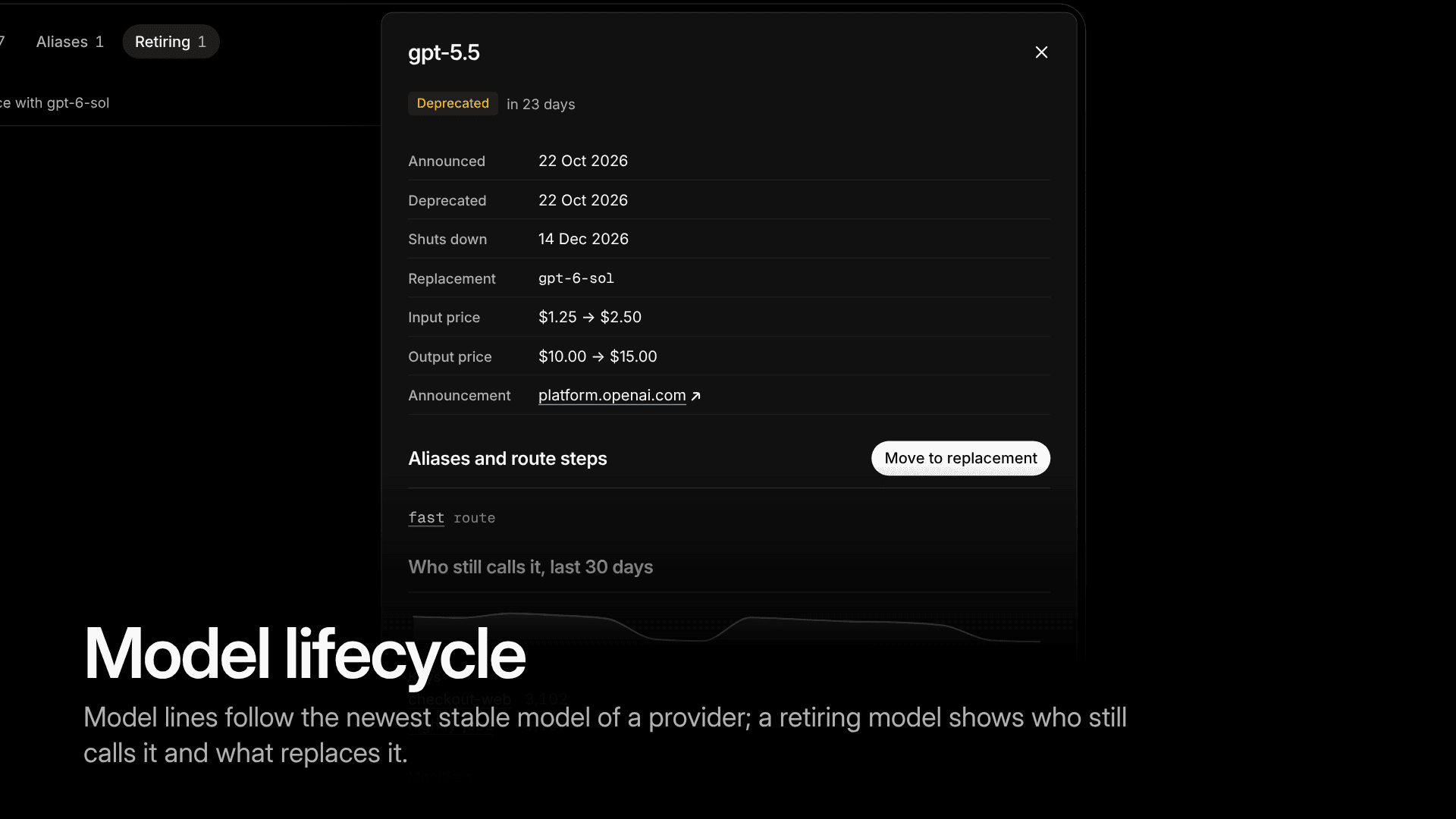
Visibility in the console. On the Organization overview, a banner names every project that uses a retiring model. Inside a project, the Models › Retiring tab lists retiring models ordered by soonest shutdown. Opening a model's sheet shows its announcement, deprecation and shutdown dates, the provider's recommended replacement, the exact price difference, every alias and route step that references the model, and every caller from the last 30 days — broken down by API key, member, service account and client application (from
User-Agent), alongside a daily request chart so you can see whether traffic is actually draining.Standard HTTP deprecation headers for apps. Every reply served by a model with announced retirement dates carries standard headers so SDKs, logs and caller dashboards see the countdown automatically:
Email notices and webhooks. Project members with
models.viewreceive Model deprecated when KPMR publishes a shutdown date and Model shuts down soon at 30, 7 and 1 days before shutdown if the project called the model in the past 7 days. The same events fire as signed webhooks (model.deprecated,model.shutdown_soon,model.moved).One-click or automatic move to replacement. Clicking Move to replacement adds the replacement model to the project's catalogue (if not already present) and updates every alias route step that pointed at the retiring model in one audited action (
catalogue_model.move). Under the project's Settings › Model retirement, you can also turn on:- Move aliases on shutdown: automatically switches alias steps to the replacement on the shutdown day.
- Answer retired models with the replacement: transparently answers direct requests to the retired model ID with the replacement after the shutdown day (reporting the answering model in
kaeso-model). When left off, direct calls to a retired model return HTTP410 Gonenaming the shutdown date and the recommended replacement, while alias steps fail asunavailableand fall back to their next step.
Model lines: follow a family's newest stable model on your terms
When an app wants a family's current flagship without hardcoding dated model IDs, add a model line such as anthropic/claude-opus-latest under Models › Add models. Each project chooses how the line advances when KPMR updates it:
A line never moves to a model the project cannot call (for example if the project has no provider key for it or a caller's model allow-list excludes the new model), and Move back returns the line to its previous model and pins it immediately.
Next steps
- KPMR in the docs (opens in a new tab): catalogue JSON format, Ed25519 signature verification and air-gapped mirrors.
- Model lifecycle in the docs (opens in a new tab): Platform API endpoints (
/deprecations,/model-lifecycle) and MCP tools. - Models and aliases (opens in a new tab): availability checks, project overrides and model lines.
Product names in this article belong to their owners and are used only to name the software and services involved. Kaeso is not affiliated with or endorsed by them.
By Kaeso Team