Kaeso on LiteLLM’s own benchmark
We ran ai-gateway-bench, the benchmark from BerriAI, the company behind LiteLLM, with Kaeso 0.7.0 beside LiteLLM, Bifrost and Portkey. These are the numbers and the evidence behind each one.
- Published
- Reading time
- 3 min

BerriAI, the company behind LiteLLM, publishes ai-gateway-bench (opens in a new tab) to measure what an AI gateway adds on top of the model provider. We ran its local lane with Kaeso 0.7.0 added beside every gateway it compares: LiteLLM Rust, LiteLLM Python, Bifrost and Portkey. Each ran in its newest version on one machine, with the benchmark’s own mock provider and drivers unchanged.
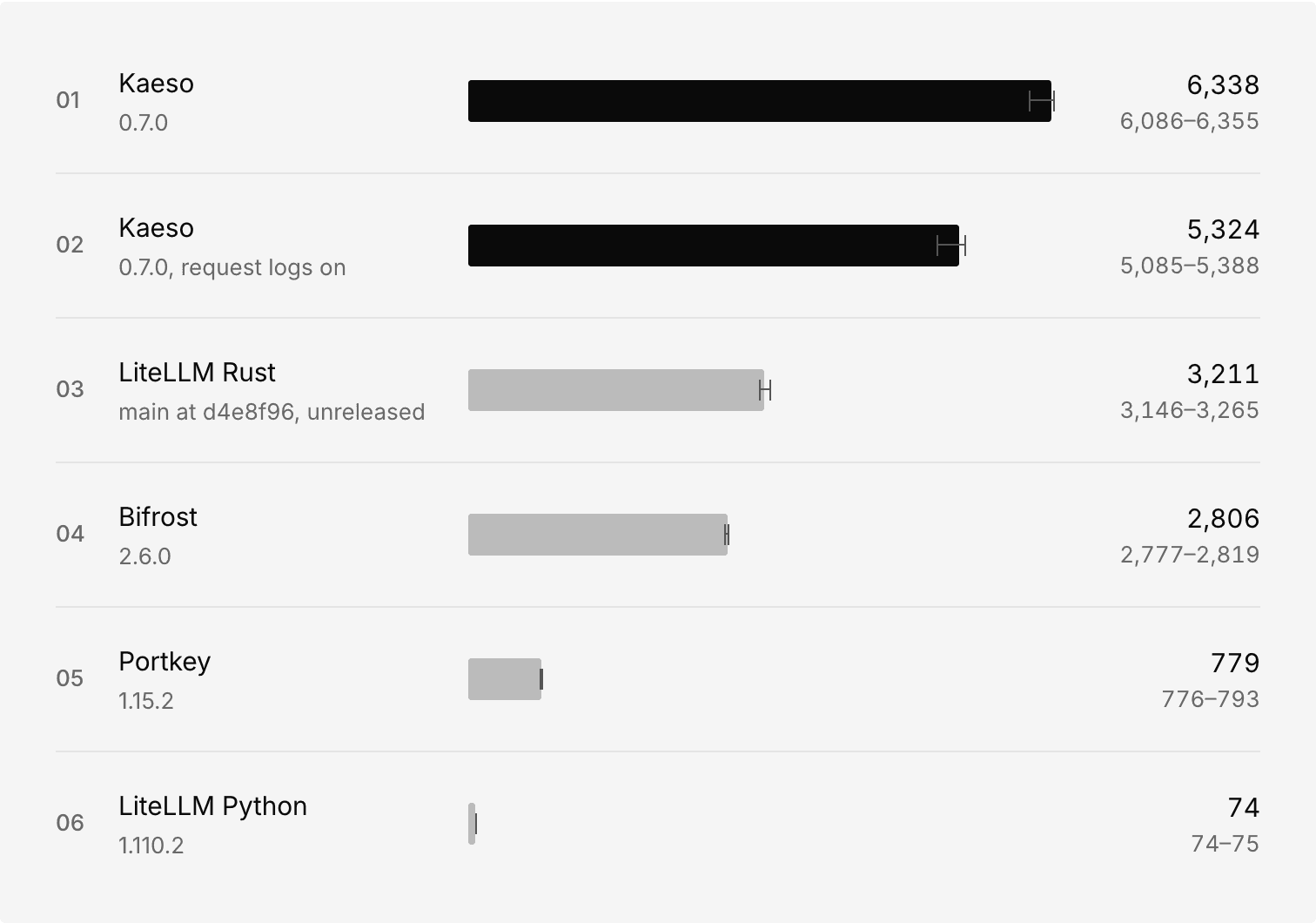
On the same two cores, Kaeso served 6,338 requests a second and LiteLLM Rust served 3,211.
The numbers
Each gateway had the same two dedicated cores. The capacity pass sends 64 clients against a mock that answers at once, so the gateway itself is the limit. The latency sweep uses the benchmark’s default mock, which answers in about 22 ms, like a fast provider. Every figure is the median of three rounds:
- Kaeso 0.7.0
- Requests a second
- 6,338
- Added p50 / p99 at 16 clients
- +0.54 / +1.47 ms
- CPU per request
- 314 µs
- Kaeso 0.7.0, request logs on
- Requests a second
- 5,324
- Added p50 / p99 at 16 clients
- +0.62 / +1.45 ms
- CPU per request
- 373 µs
- LiteLLM Rust, unreleased
main- Requests a second
- 3,211
- Added p50 / p99 at 16 clients
- +0.69 / +2.26 ms
- CPU per request
- 573 µs
- Bifrost 2.6.0
- Requests a second
- 2,806
- Added p50 / p99 at 16 clients
- +0.71 / +4.08 ms
- CPU per request
- 708 µs
- Portkey 1.15.2
- Requests a second
- 779
- Added p50 / p99 at 16 clients
- +3.13 / +20.40 ms
- CPU per request
- 1,449 µs
- LiteLLM Python 1.110.2
- Requests a second
- 74
- Added p50 / p99 at 16 clients
- +188 / +216 ms
- CPU per request
- 13,563 µs
Streams arrive as sent. Kaeso’s 99th-percentile gap between chunks was 7.8 ms, against 7.5 ms straight to the mock; LiteLLM Rust’s was 40.4 ms. Every streamed Claude Code and Codex session gave valid tool calls through every gateway, and no run of any gateway failed a request.
Where LiteLLM is ahead
A benchmark that a vendor runs should say where the vendor loses. Here is where Kaeso did:
- Memory. LiteLLM Rust never went above 86 MB and needs no database. Kaeso reached 164 MB, and its PostgreSQL and Valkey took another 271 MB.
- One client. With one request at a time, LiteLLM Rust’s p99 was +0.98 ms against Kaeso’s +1.66 ms, and no round of Kaeso’s came closer.
- A draw. Time to first token (+0.87 against +0.96 ms) and the replayed Claude Code session (+41.5 against +41.0 ms) fall within each other’s range.
- Request logs cost. With every request written to ClickHouse, Kaeso served 16% fewer requests a second.
Kaeso did more on every request
Every gateway ran as its project ships it. Kaeso checked a project’s API key and the models that project allows, and recorded usage in PostgreSQL. Both LiteLLMs compared one static master key, and Bifrost and Portkey checked no key at all. None of the others kept anything. Kaeso doing more work and still serving more requests is the result we set out to check.
The evidence
A number on a vendor’s website is only as good as what stands behind it. This is what stands behind these:
- The benchmark is theirs. It ran on
BerriAI/ai-gateway-benchat commit44365ca, with its mock provider and its three drivers unchanged:load-probe,run_http_bench.pyandsession_runner.py. Our scripts only start each gateway, pin it to its cores, pair every run with a direct run to the mock, and repeat it in rounds. - Every version is pinned. Every image ran by its digest, listed on the benchmarks page. LiteLLM Rust has no release yet, so it is named as
mainatd4e8f96. Its Dockerfile at that commit can’t build, so we compiled the same commit inrust:1.98.0. A second build on a fresh machine produced a binary with the same sha256. - Every raw result is public. Each run’s JSON and every gateway’s log are in raw.tar.gz, with the scripts, the figures as JSON and the sweep as CSV.
- It runs again on a fresh machine. We ran the published setup on a new 4-vCPU machine. Every gateway finished one round without an error. Numbers were lower on that host (Kaeso 5,287, LiteLLM Rust 2,179 requests a second), and Kaeso led again.
- The page can’t drift from the data. The benchmarks page reads its numbers from the published results. A test fails when they differ, or when a sentence such as “nearly twice the load” stops holding for the numbers.
- It’s in their repository for review. Pull request 7 (opens in a new tab) on
BerriAI/ai-gateway-benchadds Kaeso as a gateway, with this run’s results, so their maintainers can rerun it.
Who ran it
Kaeso’s author ran this benchmark, on one machine. BerriAI calls its own published results single-host and vendor-run, and the same holds here. Treat the numbers as a claim to check, and check it. The second article, how to benchmark an AI gateway without fooling yourself, covers the mistakes we caught along the way.
Run it yourself
On a fresh Ubuntu 24.04 machine with four cores, as root:
Three rounds take about 90 minutes and the capacity pass another 30. Absolute numbers change from machine to machine, so compare gateways measured in the same run. Every table, the method and every image digest are on kaeso.app/benchmarks.
By Devin Oldenburg (Logicplanes) (opens in a new tab)