Request logs, content retention and privacy controls
Control what Kaeso stores in ClickHouse and for how long: separate metadata and prompt retention, per-project and per-request content switches, guardrail redaction, media caps and agent session deduplication.
- Published
- Reading time
- 4 min
- Author
- Kaeso Team

Good observability and strict data privacy often pull in opposite directions. Engineers debugging a broken tool call or a slow stream want the exact request, timing breakdown and error message; security and compliance teams want prompts, personal data and binary attachments out of long-term storage.
Kaeso separates usage accounting, request metadata, prompt and reply content, and inline media so an organization can keep exact spend and error analytics while narrowing — or completely turning off — what is written to disk.
Four layers of control over prompt and reply content
By default, Kaeso writes one metadata row per request to ClickHouse (model, provider, status, tokens, cost, microsecond timing, key and caller) and stores the request and reply bodies alongside it. You can narrow content logging at four levels:
- Instance-wide: turn ClickHouse request logs off completely. Leave
KAESO_CLICKHOUSE_URLempty (or pass--no-clickhouse/ omitclickhousein the Helm chart). Kaeso runs without ClickHouse, and usage, rate limits and spend budgets continue to work identically through PostgreSQL and Valkey. - Organization and project switches. Under Organization settings › Logging, turning off Log request content stops storing prompt and reply bodies across every project in the organization. When the organization leaves it on, individual projects can turn Content logging off under the project's Settings (
Switch content logging). - Per request from the app:
kaeso-log-content: off. Any application can send the headerkaeso-log-content: offon a sensitive call. Kaeso logs the request's metadata, tokens and cost as usual, and omits the prompt and reply bodies for that request. (An app header can only turn content logging off, never on when the project or organization has it off.) - Redact secrets and personal data before logging. When a project uses built-in guardrails with Mask in the request log enabled, detected API keys, emails, phone numbers, IBANs, payment cards, IP addresses and custom regex matches are replaced with placeholders (
[EMAIL_1],[API_KEY_1]) in the stored log entry — even for detectors set to Count only that leave the live prompt untouched.
Reading stored prompts and outputs in the console or exports also requires its own permission, View prompts and outputs, separate from View request logs. Embedding vectors are never stored.
Media in requests and replies: off by default, bounded to 10 MiB
Prompts and replies increasingly carry base64 images, PDFs and audio clips. To prevent a few multimodal apps from filling your disk:
- Off by default (
Keep media: Off). Kaeso replaces inline files, uploads anddata:URLs in the log with their media type, byte size and image dimensions — for exampleImage (PNG, 1,024 × 768, 1.2 MB), not kept. - Opt-in (
Keep media: On). When enabled for both the organization and the project (alongside content logging), Kaeso keeps up to 10 MiB of media per request, in order of appearance, so you can preview images, play audio and download files in the request inspector. Generated video clips and realtime WebSocket audio are never stored in the request log.
Separate retention windows, deduplication and targeted deletion
Under Organization settings › Logging, each organization sets two independent retention periods (bounded by the install's maximums):
- Metadata retention
- Default
90 days- What expires
- The request log rows themselves (status, tokens, timing, cost, caller)
- Content retention
- Default
30 days- What expires
- Stored request and reply bodies and any kept media (never longer than metadata retention)
Shortening either retention deletes older data immediately after confirmation while keeping usage and spend totals in PostgreSQL intact.
Conversation deduplication for coding agents
Coding tools such as Claude Code and Codex resend the entire conversation history on every turn — often dozens of kilobytes of system instructions and earlier tool results repeated fifty times in a session. In Kaeso 0.7.0, ClickHouse deduplicates repeated long messages across turns on disk while reconstructing every individual request identically when you open or export it. The Storage tab under Logging shows both the Logical size and the actual On disk footprint per project.
When you need to purge specific records immediately, open Logging › Deletions › Delete logs, pick one or all projects and the UTC days to remove, and confirm with delete.
Finding and replaying requests in 0.7.0
Kaeso 0.7.0 adds deep filtering and replay tools to a project's Request logs (and to the Tools tab for MCP portal calls):
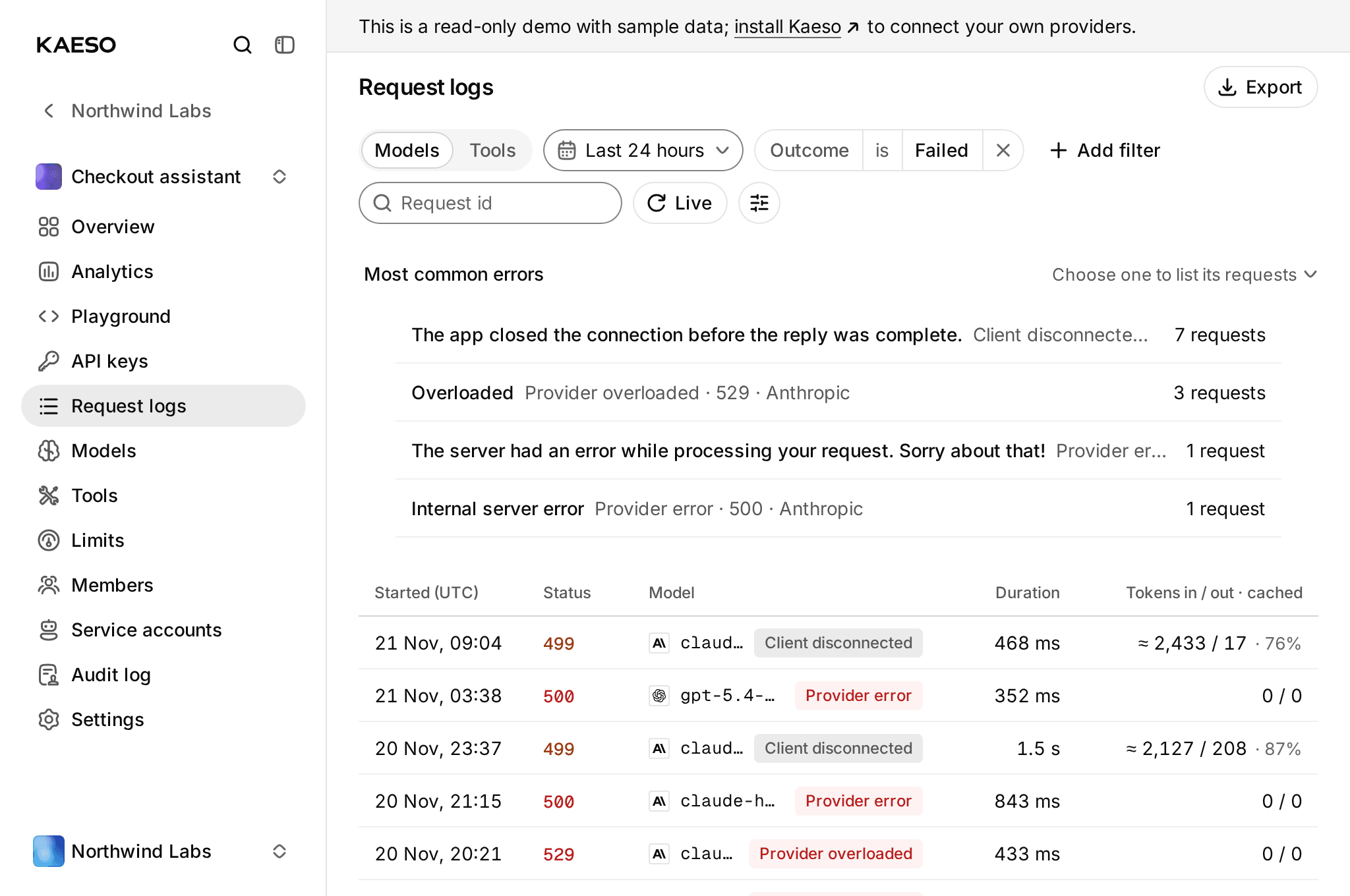
- Most common errors: Filter outcome to Failed, and the top of the page groups the period's ten most frequent failure patterns (normalized across dynamic IDs and numbers) with request counts and one-click filtering.
- Filter by anything on the path: Narrow by model, the requested model or alias name (even after deletion), Fell back, app format → provider format, status, error kind, error message substring,
kaeso-tags, Client (parsed fromUser-Agent, such as Codex, Claude Code or the OpenAI Python SDK), Guardrail verdict, duration (Slower than) or minimum cost. - Microsecond timing breakdown: Each request separates Request upload (client network time), Kaeso overhead (auth, KPP translation, guardrails and Valkey limit checks — shown in microseconds when under 1 ms, such as
180 µs), upstream wait time, and Stream processing. - Replay and export: Open any chat request directly in the Playground with its parameters pre-filled, copy a JSON request with Copy as curl, or export filtered logs as CSV or JSON Lines (with or without content; CSV exports automatically escape leading
=,+,-,@characters against spreadsheet formula injection).
Next steps
- Request logs in the docs (opens in a new tab): every filter, column, cost-basis marker and export format.
- Guardrails for model requests and replies: mask personal data and secrets before they enter the request log.
- Hard budgets, rate limits and organization currencies: how usage and costs are counted even when request logs are turned off.
Product names in this article belong to their owners and are used only to name the software and services involved. Kaeso is not affiliated with or endorsed by them.
By Kaeso Team